Screen time you don’t have to feel guilty about.
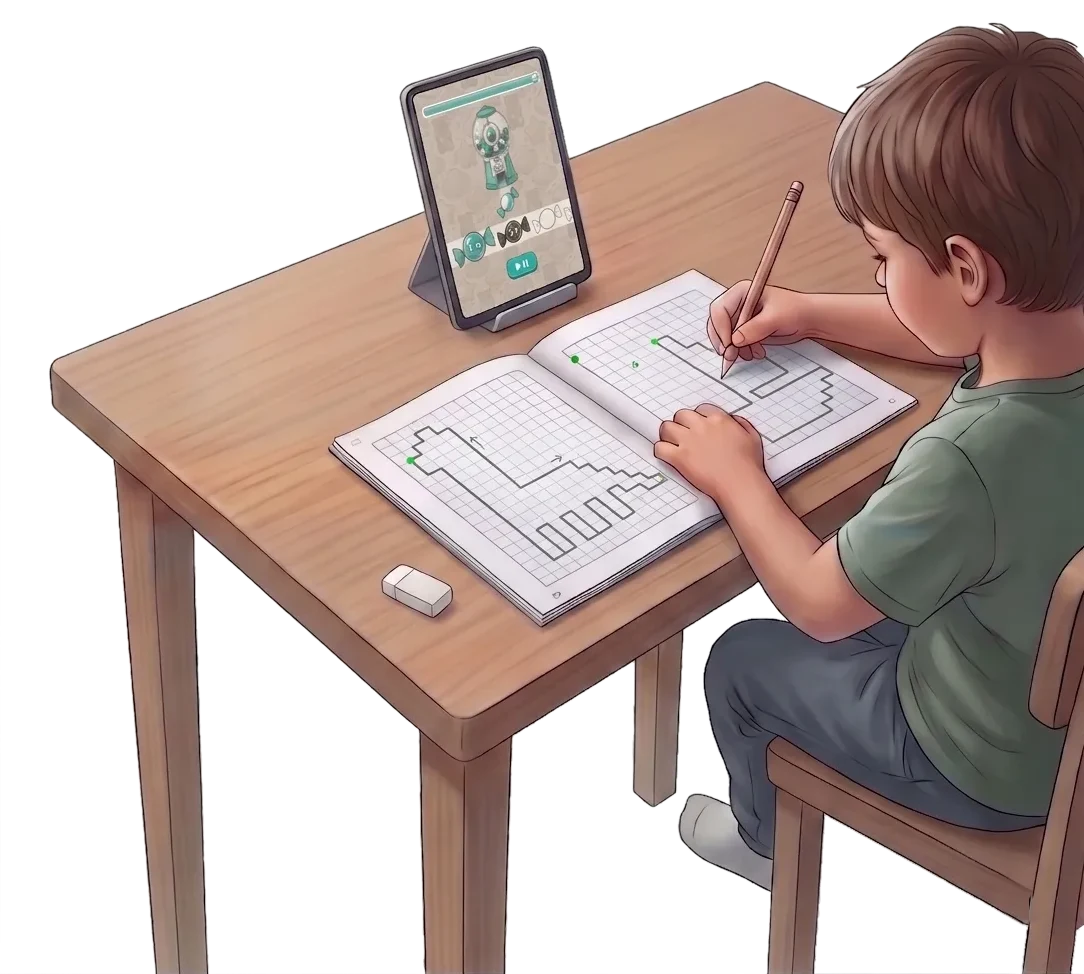
Smart graphic dictations that end up on paper: the app calls out the route, your child counts the squares and draws it in an ordinary notebook with an ordinary pencil — grid drawing that quietly gets the hand ready for writing.
Get Brainy Grid- Builds fine motor skills
- Tracks the progress
- One app instead of a shelf of workbooks
- No ads
Turn the digital noise down. Turn real development up.
Looking for healthy screen time — an ad-free app that leaves something behind? Most apps tend the leaves: letters, numbers, the right answer tapped on glass. Brainy Grid works on the roots underneath — spatial awareness, working memory, impulse control. Without those roots school turns into a daily struggle, and a finger sliding across a smooth screen prepares no one for a school pencil.
-
The power of a real pencil
Paper pushes back. That friction is what trains the small muscles of the hand and settles the grip — a screen gives the hand nothing to work against.
-
Active thinking, not passive watching
Your child holds an instruction in mind, counts the squares, picks the direction and moves the pencil. Nothing on the screen does that step for them.
-
Quiet focus
No timers, no loud rewards, no pop-ups. One task at a time, at whatever pace your child needs.
From the first stroke to a detailed report — four steps
No stylus, no special paper, nothing to print out. A squared notebook and a pencil are enough — the app dictates each route and checks the drawing itself, which a printed worksheet cannot do.
- 01
Pick a mission
Animals, dinosaurs, transport, fairy tales — 200+ drawings across 8 themes, sorted into 4 difficulty levels.
- 02
Draw for real
The app reads out the route step by step — three squares right, one diagonal up. Your child counts and draws. The tablet is only the navigator.
- 03
Smart analysis
Point the camera at the finished drawing. The app reads it square by square, right on the device, and turns it into a report you can actually act on.
- 04
A clear path to school readiness
Brainy Grid doesn’t just point out mistakes. It translates the analysis into evidence-based advice, showing you exactly how to support your child’s development and build a solid foundation for school.
Built on published developmental research
We translated peer-reviewed science into practical screen time that actually gives something back to the hand: fine motor skills, pre-writing skills and visual-motor integration, built one dictation at a time.
-
Prepares the hand for math
Counting squares and landing on grid nodes trains visual-motor integration — a skill directly linked to early math abilities in young children.
Source: Meta-analysis (Li et al., 2025) -
Why paper beats the screen
A stylus slides on glass, but paper pushes back. Studies show that physical pencils provide the friction needed to develop legible, confident handwriting.
Source: Study (No & Choi, 2021) -
Paced for early focus
No loud rewards or endless feeds. Dictations are built to be finished in one quiet sitting, matching a child’s natural attention span before fatigue sets in.
Source: Meta-analysis (Infantes-Paniagua, 2021)
Brainy Grid is an educational product, not a medical device. For concerns about your child’s development, talk to a professional.
Spot the hidden markers of school readiness.
Every scanned dictation becomes a profile across 5 skills, so progress stops being a matter of opinion. It is also how you spot the early markers of future school difficulties — the quiet ones, between 4 and 7, while they are still easy to work on.
-
Orientation (working memory)
Left and right traded places here, then the pencil came back. Working memory is what holds the instruction while the brain turns it into movement.
-
Counting (number sense)
One paw came out a square short: two were called, one was drawn. Miscounting is not carelessness — it is quantity slipping while attention is busy elsewhere.
-
Neatness (visual–motor integration)
The corner missed the crossing of the grid lines. Eye and hand agreeing on a target is the same skill that later keeps letters inside the ruled line.
-
Smoothness (pencil control)
Not just neatness. This is the physical stamina it takes to write through a full lesson without the hand cramping up.
-
Persistence (impulse control)
The inner director. Accuracy fading in the second half is attention running out — not carelessness, and not a verdict.
A safe space, with no small print
-
Works offline
Dictations, recognition and the whole progress history run on the device. No screen in the child’s part of the app waits for a connection, so it works on a plane, in the car or anywhere with no internet at all.
-
Photos never leave the device
Drawings are read on your phone and stay there — along with your child’s exact age. If you choose to sign in, only a nickname, an age band, and the numeric scores of each attempt sync, so the report opens on the family’s second device; they are stored in the EU. No photo ever leaves.
-
No ads, no account needed
No banners, no reward videos, no tracking for advertising. An account is optional and lives behind a parental gate, as does every purchase.
Questions parents ask first
My child already swipes at screens. Why bring paper into it?
In Brainy Grid a child never traces a picture on the glass. The app only calls out the route; the counting and the drawing happen in a real notebook. Research on six-year-olds writing on paper versus a tablet found screen strokes are larger, faster and less legible — the stylus slides where a pencil grips.
How does the app check a drawing on paper?
You photograph the finished drawing. The app finds the notebook grid, follows the pencil line square by square and compares it with the route it dictated: were the directions right, did the step counts match, how close did the line land to each node. Those measurements become the five skill scores. All of it happens on the device.
What does “local-first” mean? Are the photos stored online?
It means recognition, scoring and history live on your device. Photos of drawings are never uploaded — not for analysis, not for backup. A network connection only matters if you decide to sign in and sync reports between two of your own devices, and even then the photos stay where they are.
What age is it for?
Roughly 4 to 8. For a four-year-old, use a notebook with large squares and pick the short dictations — at that age the point is understanding directions. By six or seven the squares get smaller and the routes longer, which is where focus and pencil control really build.
Make the tablet an ally, not a rival
Start with one dictation, a notebook and a pencil. The rest follows from there.
 Coming soon to the
  Get it on